
What Is iOS 26? Big Picture
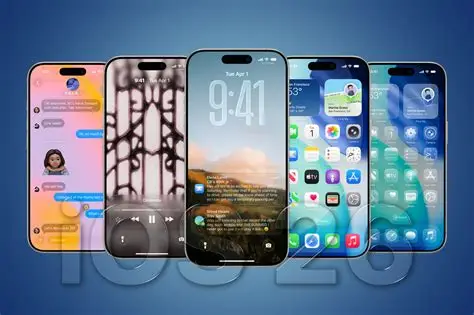
Apple officially launched iOS 26 on September 15, 2025, marking one of the biggest software updates for the iPhone in recent years. The update isn’t just about polishing what was already there; it introduces a full design overhaul, deeper AI/“Intelligence” features, improvements to core apps, and functionality that reflects what U.S. users care about: privacy, usability, and cross-device seamlessness. These ios 26 new features are set to enhance the user experience significantly.
Liquid Glass: A Brand New Design Language
One of the most striking changes in iOS 26 is the introduction of Liquid Glass, Apple’s design language applied across iPhone, iPad, Mac, and Apple Watch.
Understanding these ios 26 new features will help users make the most of the new update.
It brings translucency, soft layers, rounded edges, and dynamic effects (for example, app icons and interface elements that change according to background, light/dark mode, etc.).
Interface elements like tab bars shrink when scrolling and expand when needed; alerts pop out from the initiating button; navigation elements morph depending on context.
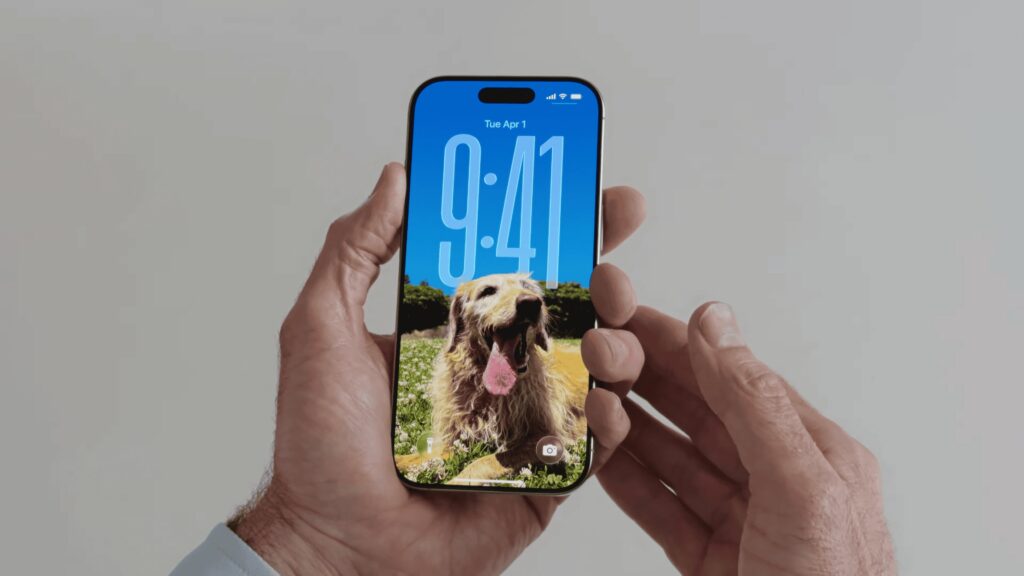
The Lock Screen and Home Screen get special treatment:- adaptive time display, spatial scenes for photos (3D-like effects for wallpapers), animated album art.
For U.S. users, this means your iPhone will look more modern, more fluid, and more visually engaging — but there might be a small learning curve.
Apple Intelligence, Live Translation, and Visual Intelligence

With iOS 26, Apple doubles down on what’s being branded as Apple Intelligence. These are smart, privacy minded features that aim to make the device more helpful, especially for the multicultural, multilingual U.S. market.
Live Translation:- Whether in Messages, FaceTime, Phone calls, or in person using AirPods, the phone can translate between languages in real time. U.S. users benefit from this especially, given the diversity of languages spoken.
Visual Intelligence:- Recognize content on screen (images, text, etc.), allowing users to take contextual actions for example, adding events, shopping, copying content, etc.
New creative tools:- Genmoji, Image Playground (for styling images), etc.
Privacy is emphasized many AI features run on device; for more complex tasks, Apple uses something called Private Cloud Compute. U.S. users tend to be sensitive about data, so this is a big point.
Improvements in Phone, Messages, and Safety
iOS 26 delivers several updates in core communication and safety features again, things U.S. users often expect:- strong privacy, spam / scam protection, useful customization.
- Call screening & hold assist:- If an unknown number calls, you have better options to screen (see transcript / reason) before answering. Also, tools to manage being on hold more gracefully.
- Improved Messages:- polls in group chats, custom backgrounds, typing indicators. Makes group communication more expressive and visible.
- Maps improvements:- learns preferred routes, tracks visited places, gives timely alerts on delays, suggests alternate paths. Useful for U.S. commuters, travel, etc.
Pricing & Cost of iOS 26
Free Update :- iOS 26 is available as a free download for all compatible iPhones.
Supported Devices :- To get iOS 26, you must have a compatible device. It supports iPhone 11 and newer models, along with iPhone SE (2nd generation and later) . Devices older than that are not eligible to upgrade.
No Subscription Fee for Core OS :- There’s no extra subscription or licensing cost just to run the operating system itself. Any fees would only be for optional services (e.g. iCloud storage, certain features, subscription-based apps) not included directly in iOS 26.
“Cost” in Terms of Performance / Hardware :- While iOS 26 is free, some advanced features (especially those under Apple Intelligence, Visual Intelligence, Live Translation, etc.) require newer hardware to work smoothly or are only enabled on later-generation iPhones. Thus, while you don’t pay money for the OS, there is an implicit “cost” if you need to upgrade your device to get full benefit.
Other Noteworthy Features
Battery & Performance:- Adaptive Power mode which tweaks performance & brightness to save battery. U.S. users who frequently use their phones all day will appreciate this.
Safari, Camera, Photos:- Redesigned UI in many apps; better HDR screenshots & screen recordings; spatial scenes for wallpaper; improved menu navigation.
Support / Compatibility:- iOS 26 supports iPhone 11 and newer (including SEs from 2020 onward). Older models are left out.
Why U.S. Users Should Care
The U.S. is one of Apple’s largest markets. Features like Live Translation and call screening address specific U.S. concerns:- immigration, multilingual society, spam / scam calls.
Privacy has been a big issue in U.S. tech regulation and consumer awareness; Apple’s on device intelligence helps appeal to that.
Visually, many U.S. users adopt interface trends, and design updates matter in device appeal (both for personal satisfaction and status). A modern interface = more satisfaction, lower frustration.
App ecosystem: U.S. developers will get new tools (Apple Intelligence, Foundation Models, etc.) which may lead to richer apps, better localization.
Possible Downsides or Things to Be Aware Of
The dramatic UI change (Liquid Glass) is visually impressive but may reduce readability for some. Early reviews note that Apple had to adjust transparency/bloat etc. after beta feedback.
Some features need newer hardware (the ones with Apple Intelligence or advanced graphics). Users with older compatible phones may not get full benefit.
As with any major update , temporary dips in battery life, bugs, etc. Users may prefer waiting for incremental updates.
Conclusion
iOS 26 is a major milestone for Apple a bold design shift with Liquid Glass, smarter AI-driven features, enhanced communication tools, and privacy improvements. For U.S. users, many of the changes align well with current trends:- more multilingual communication, concern over spam, desire for aesthetic polish, and privacy protections.
If you have a compatible device (iPhone 11 or newer), it’s worth planning the upgrade. Make sure to back up, check which features you’ll use most, and give yourself a little time to get used to the new design.